How to switch clients safely
Change the operational context without acting on the wrong client.
Examples use “Clients”. If you manage ads for your own company, this section is called “Companies”. The steps are the same.
Copy the article as Markdown to paste it into an AI agent.
Before you begin
- Access to at least two clients in the active Workspace to perform a switch. With only one client, this guide still helps you recognize the selector.
- Cancel or complete forms in progress before switching.
Expected result
You will switch the operational context and confirm the selected client before any action that can change data.
Before you start
The client selection may remain saved across pages, sessions, and devices. In Campaigns, switching can also start a new provider read and update local data.
Requirements
- Access to at least two clients in the active Workspace to perform a switch. With only one client, this guide still helps you recognize the selector.
- The correct Workspace is selected.
- No important form is left incomplete.
Permissions
Every role can switch among clients they can access. Owners and Admins see all clients. Members and Viewers see only assigned clients.
Steps
- Complete or cancel any open form.
- Confirm the active Workspace.
- Open the operational area you need.
- Open the client selector, identified by the current client or Select a client.
- Choose the destination client.
- Wait for the area to update.
- Check the client name again before creating, editing, pausing, activating, adjusting a budget, or deleting.
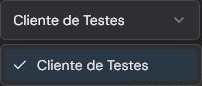
This image identifies the real selector on the Campaigns page. Because only Cliente de Testes is accessible in this capture, the current option is repeated and there is no client switch to demonstrate.
Validation
Choosing an item switches the selector to the destination client immediately. There is no separate confirmation button. The page data should match the selected client. In Campaigns, earlier row selections are cleared and the context may be reflected in the URL.
Troubleshooting
- If the client is missing, review the Workspace and your assignment.
- If the page shows unexpected data, stop and check the client and date range.
- If the previous client is no longer accessible, Agencify may select the first available client.
Limits and safeguards
There is no confirmed global safeguard that blocks switching while an unsaved form is open. The selector's location varies by area. Switching clients does not change a campaign by itself, but it can start provider reads and local synchronization in Campaigns.
Related articles
- How Agencify works.
- How to create your first client.
- What Agencify reads, syncs, and changes.
Was this article helpful?
Related articles
- How Agencify worksLearn how Workspaces, clients, and operational areas define the context of your actions.
- How to create your first clientCreate a client with a connected Meta or Google account, appropriate assignees, and the right AI authorization.
- What Agencify reads, syncs, and changesDistinguish provider reads, local synchronization, and real changes in Meta or Google.