How to check ad balances and set alerts
Review Meta Ads billing and the remaining Google Ads account budget, then receive low-amount alerts on WhatsApp.
Examples use “Clients”. If you manage ads for your own company, this section is called “Companies”. The steps are the same.
Copy the article as Markdown to paste it into an AI agent.
Before you begin
- A client with at least one linked Meta Ads or Google Ads account.
- Confirm the active Workspace and the correct ad account for the client.
Expected result
In Clients, you can review balance and billing details for linked ad accounts. When an account is eligible, you can also set a minimum amount and receive a WhatsApp alert when the available balance or remaining account budget reaches that range.
Before you start
- Confirm the active Workspace and open the correct client.
- The client needs a linked Meta Ads or Google Ads account and an active integration.
- Owners, Admins, and Members can configure alerts. Viewers can only review them.
Which accounts support alerts
For Meta Ads, the alert is available when the integration can read an available balance for the account. That balance does not determine whether billing uses manual or automatic payments, so Agencify does not use it to label the payment type.
For Google Ads, the alert tracks the remaining account budget for monthly invoicing accounts with an active, finite account budget. The integration does not provide a compatible available balance for card, automatic payment, or manual payment accounts. Review billing in Google Ads for those accounts.
Steps
- Open Clients in the correct Workspace.
- Find the client and open Account Balances, Meta Ads Balance, or Google Ads Balance on the card or row.
- If both platforms are linked, choose Meta Ads or Google Ads in the panel.
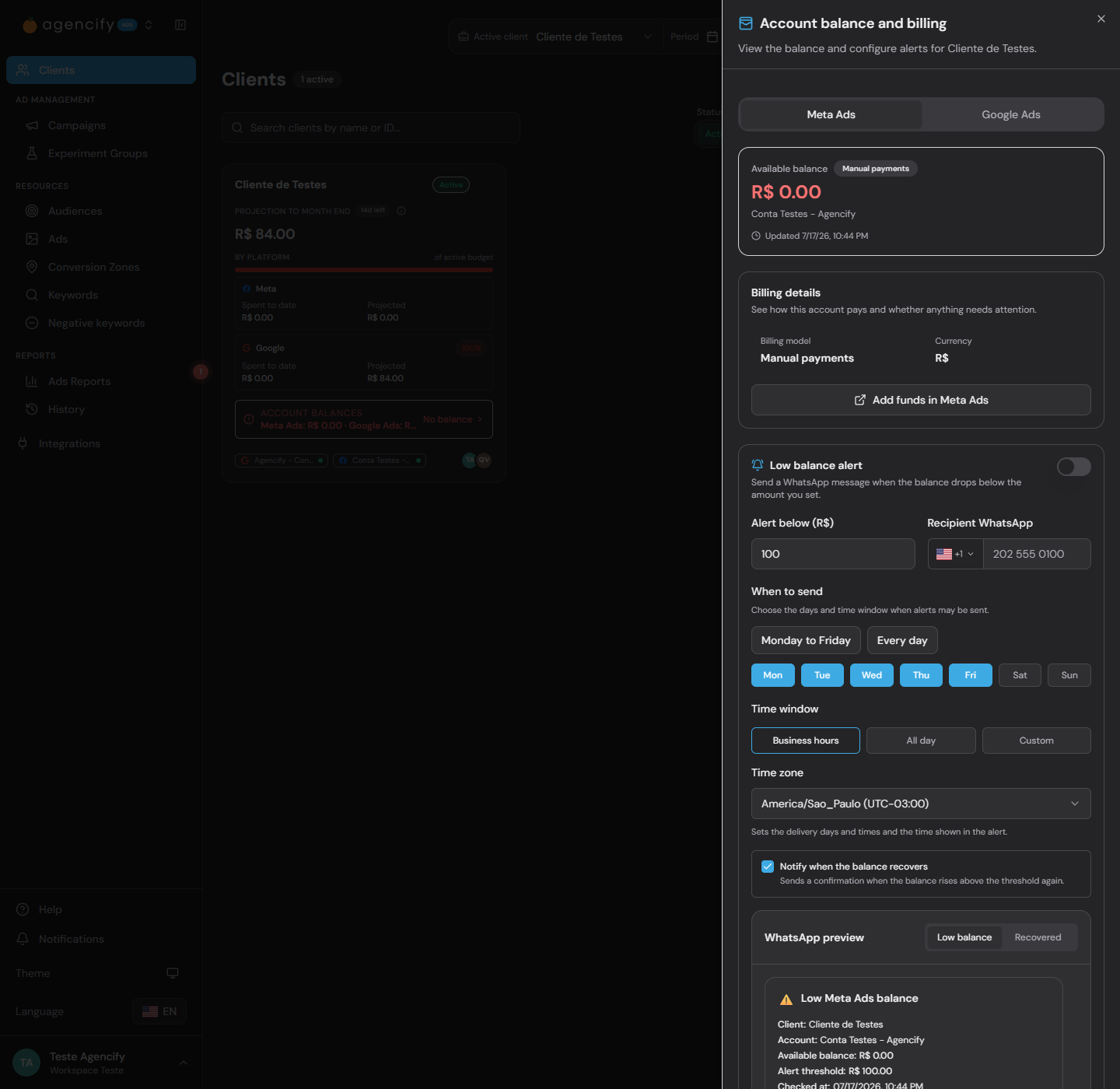
- Review the billing model, available amount, last update, and provider billing link.
- If the account is eligible, find Low balance alert and turn it on.
- Under Alert below, enter the amount that should trigger the warning.
- Enter the recipient's WhatsApp number with the country code.
- Choose the delivery days, time window, and time zone. Also decide whether to receive a recovery confirmation.
- Review the WhatsApp preview and select Save alert.
- After saving a valid configuration, use Test alert only when you need to confirm delivery.
Validation
The client card shows how many alerts are effectively active. You can also open Automations and select Balance Alerts to edit, pause, test, or delete configurations and review delivery history.
Troubleshooting
- If no amount appears, confirm the linked account and active integration, then run the first billing check when the button is available.
- If the alert section is unavailable, review the billing model. Not every account exposes a compatible value through the provider API.
- If the fields are disabled, review your Workspace role. Viewers have read-only access.
- If an alert is automatically paused, review the client, account, integration, subscription, and billing eligibility. Valid temporary conditions resume automatically.
- If a provider read fails, Agencify does not send a low-balance message based on a stale or invented amount.
Limits and safeguards
These details support daily operations but do not replace the financial area in Meta Ads or Google Ads. Active alerts are evaluated every hour and follow the selected delivery days and hours. While the amount remains low, warnings are separated by at least three hours. The recipient number remains protected, and only its ending may appear on management screens.
Related articles
- How to create your first client.
- How to connect Meta safely.
- How to connect Google safely.
- Reports and schedules overview.
Was this article helpful?
Related articles
- How to create your first clientCreate a client with a connected Meta or Google account, appropriate assignees, and the right AI authorization.
- How to connect Meta safelyAuthorize the correct identity, review discovered accounts, and know when to reconnect.
- How to connect Google safelyAuthorize the correct Google account and review discovered direct accounts and MCC subaccounts.
- How reports and scheduling workUnderstand how to turn data into shareable reports and controlled recurring deliveries.